
Why a Reliable Power Supply Matters
The NBN connection box (FTTP) or modem (HFC) relies on a steady 12 V DC, 2.5 A feed to keep the broadband service active. A failed or missing adapter will immediately drop the connection, making a quick replacement essential for uninterrupted internet access.
Core Specifications of a Standard NBN Power Supply
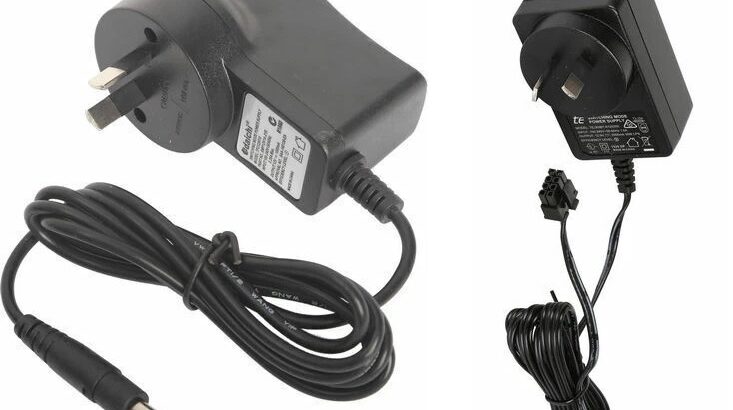
The NBN power supply delivers a regulated 12 V DC output at up to 2.5 A, providing reliable power for both FTTP and HFC connections. For FTTP installations the unit terminates in an 8‑pin Molex plug that mates directly with the NBN box, while HFC setups use a 12 mm barrel jack with a centre‑positive tip, the common “positive‑tip” configuration.
Built‑in overload and short‑circuit protection ensures compliance with Australian and New Zealand electrical safety standards.
Installation is plug‑and‑play: simply connect the supply to mains power and to the NBN device, no additional wiring or configuration is required.
Compatibility Overview
FTTP (Fibre‑to‑the‑Premises) connections use an NBN/UFB optical fibre box that is wall‑mounted. The power supply required for this setup is a 12 V DC, 2.5 A adapter with an 8‑pin Molex connector and the key connector on the device is an 8‑pin Molex.
HFC (Hybrid Fibre Co‑Axial) connections are typically paired with an Arris CM8200 series modem (including CM8200, CM8200B and CM8200BP2) or Zyxel DE3301 modem. These devices need a 12 V DC, 2.5 A power adapter that terminates in a 12 mm barrel jack with centre‑positive polarity, which serves as the key connector.
| Connection Type | Typical Device | Required Adapter | Key Connector |
|---|---|---|---|
| FTTP (Fibre‑to‑the‑Premises) | NBN/UFB optical fibre box (wall‑mounted) | 12 V DC, 2.5 A, 8‑pin Molex | 8‑pin Molex |
| HFC (Hybrid Fibre Co‑Axial) | Arris CM8200 series (CM8200, CM8200B, CM8200BP2) | 12 V DC, 2.5 A, barrel jack | 12 mm barrel, centre‑positive |
Using the wrong connector (e.g., an 8‑pin plug on an HFC box) will prevent the device from powering up and may damage the port.
Sourcing a Replacement: Options and Recommendations
Campad Electronics is the preferred supplier for replacement NBN power supplies, offering model‑specific units for both FTTP and HFC applications. Their FTTP power supply delivers 12V DC at 2.5A through an 8‑pin Molex connector and is priced at $24.95.
The HFC power supply provides the same 12V DC, 2.5A output but uses a barrel‑jack connector, also at $24.95.
Both units are certified to Australian and New Zealand safety standards and incorporate overload and short‑circuit protection. Campad Electronics provides same‑day dispatch, ensuring rapid replacement and offers competitive pricing compared with larger retailers.
1. Campad Electronics. The Preferred Supplier
- FTTP Power Supply: 12 V DC, 2.5 A, 8‑pin Molex. $24.95
- HFC Power Supply: 12 V DC, 2.5 A, barrel jack. $24.95
Why Choose Campad Electronics
- Dedicated, model‑specific units for both FTTP and HFC
- Certified to Australian/New Zealand safety standards
- Overload & short‑circuit protection built in
- Same‑day dispatch for rapid replacement
- Competitive pricing compared with larger retailers
2. Alternative Retailers
- Jaycar Electronics (Australia): 12 V DC, 2.5 A FTTP Molex adapter, $32.95
- Wiltronics: 12 V DC, 2.5 A FTTP Molex plug, $34.95
- Woolworths (Online): TE 12 V DC, 2.5 A HFC adapter for Arris CM8200 series, $49.95
- Double Bay Hardware: Daichi Switch‑Mode 12 V DC, 2.5 A barrel jack, $41.70
While these alternatives are functional, they often carry higher price tags, longer delivery times or lack the explicit “FTTP/HFC” labeling that reduces the risk of ordering the wrong connector.
How to Replace the Power Supply
Identify your connection type by checking whether you have a wall‑mounted FTTP box or a black Arris HFC modem. Once you know which device you are working with, power down the unit by unplugging the mains supply from the NBN equipment.
With the power removed, disconnect the faulty adapter from the device’s power port. Take the new adapter and align its 8‑pin Molex connector (for FTTP) or barrel‑jack plug (for HFC) with the corresponding socket on the device, then plug the mains side of the adapter into a wall outlet.
Finally, restore power to the device and verify that the NBN status lights show a live connection.
- Identify Your Connection Type: Check whether you have a wall‑mounted FTTP box or a black Arris HFC modem.
- Power Down: Unplug the mains supply from the NBN device.
- Remove the Faulty Adapter: Disconnect the existing power cord from the device’s port.
- Connect the New Adapter: Align the 8‑pin Molex (FTTP) or barrel jack (HFC) with the device’s socket and plug the mains side into a wall outlet.
- Verify Operation: Power the device back on and confirm that the NBN status lights indicate a live connection.
If the device fails to power up after a correct replacement, double‑check the polarity (centre‑positive for barrel jack) and ensure the mains outlet is functional.
When to Involve Your ISP
When dealing with warranty or service‑level issues, it is important to remember that NBN Co owns the connection box. If a fault is confirmed, a technician can replace a defective power supply at no cost.
If you are facing long lead times, contact your ISP first. However, if you need immediate service ordering a third‑party adapter, preferably from Campad Electronics, will restore connectivity within a day.
- Warranty or Service‑Level Issues: NBN Co owns the connection box; a technician can replace a defective power supply at no cost when the fault is confirmed.
- Long Lead Times: Contact your ISP first; however, if you need immediate service ordering a third‑party adapter (preferably from Campad Electronics) will restore connectivity within a day.
Verdict: Best Value and Reliability
Campad Electronics delivers the most reliable, cost‑effective solution for both FTTP and HFC NBN power supplies. Their dedicated, safety‑compliant adapters eliminate compatibility confusion and same‑day shipping minimizes downtime. At $24.95 per unit, Campad Electronics undercuts larger retailers while providing the exact connector required for each NBN configuration.
Bottom Line: Identify your NBN connection type, purchase the matching 12 Volt DC 2.5 Amp adapter from Campad Electronics and follow the simple plug‑and‑play replacement steps to restore broadband service instantly.
FAQs: Replacing Your NBN Power Supply (FTTP & HFC)
What voltage and current does the NBN power supply provide?
12V DC at up to 2.5A.
Which connector is used for FTTP (fibre‑to‑the‑premises) boxes?
An 8‑pin Molex plug.
Which connector is used for HFC (hybrid fibre‑co‑axial) Arris CM8200 series modems?
A 12 mm barrel jack, centre‑positive polarity.
Can I use an FTTP Molex adapter on an HFC modem or vice‑versa?
No. The connectors are different; using the wrong type will prevent power‑up and may damage the port.
Where can I buy a replacement power supply that is guaranteed to be compatible?
Campad Electronics. FTTP Molex adapter ($24.95) or HFC barrel‑jack adapter ($24.95). Same‑day dispatch is offered.
What are the alternative sources if Campad Electronics is unavailable?
- Jaycar Electronics: FTTP Molex, $32.95
- Wiltronics: FTTP Molex, $34.95
- Woolworths (online): HFC barrel‑jack for Arris CM8200, $49.95
- Double Bay Hardware: Daichi SMPS barrel‑jack, $41.70
How do I identify whether I have an FTTP or HFC connection?
FTTP uses a wall‑mounted NBN/UFB optical fibre box; HFC uses a black Arris CM8200‑type modem.
What is the step‑by‑step procedure to replace a faulty power supply?
- Identify connection type (FTTP or HFC).
- Unplug mains power from the NBN device.
- Disconnect the defective adapter from the device.
- Connect the new adapter (Molex for FTTP, barrel‑jack for HFC) to the device.
- Plug the mains side of the adapter into a wall outlet.
- Power the device back on and verify NBN status lights indicate a live connection.
What should I check if the device does not power up after replacement?
Verify correct polarity (centre‑positive for barrel‑jack), ensure the adapter is the proper model and confirm the wall outlet is functional.
When should I involve my ISP or NBN Co instead of ordering a third‑party adapter?
If the power supply is under warranty or you suspect a broader fault, contact your ISP; NBN Co can dispatch a technician to replace the unit at no charge. If you need immediate service and the device is out of warranty ordering a replacement (preferably from Campad Electronics) is appropriate.
Are the Campad Electronics adapters safety‑certified?
Yes. Both FTTP and HFC adapters meet Australian and New Zealand electrical safety standards and include overload and short‑circuit protection.
Do I need to configure anything after installing the new adapter?
No. The adapters are plug‑and‑play; once connected, the NBN device will power up and reconnect automatically.
What is the cost advantage of buying from Campad Electronics?
At $24.95 per unit, Campad Electronics is roughly $10–$25 cheaper than alternative retailers while providing the exact connector required for each NBN configuration.
Can I use any generic 12 V DC 2.5 A adapter as a replacement?
Only if it has the correct connector (8‑pin Molex for FTTP, centre‑positive 12 mm barrel for HFC) and meets Australian/New Zealand safety standards. Generic adapters lacking the proper plug or certification are not recommended.
How long does same‑day dispatch from Campad Electronics take to arrive?
Typically within 24 hours of order placement, subject to the buyer’s location and courier service availability.
What protection features are built into the NBN power supplies?
Overload protection, short‑circuit protection and regulated 12 V output to prevent voltage spikes.
Is there any maintenance required for the power supply after replacement?
No regular maintenance is needed; ensure the adapter remains clean, free of dust and that the mains outlet is stable.
Will using a higher‑current (e.g., 3 A) adapter cause problems?
No, as long as the voltage is 12 V DC and the connector matches, a higher current rating is safe; the device will draw only the current it requires (up to 2.5 A).
What should I do if the NBN status lights remain off after a correct replacement?
Check the mains outlet, confirm the adapter is fully seated, verify polarity (for barrel‑jack) and if the issue persists, contact your ISP for further diagnosis.